Level Up Your Campus Life: A Deep Dive into Marvel Rivals Season 5 College Event Rewards & Progression
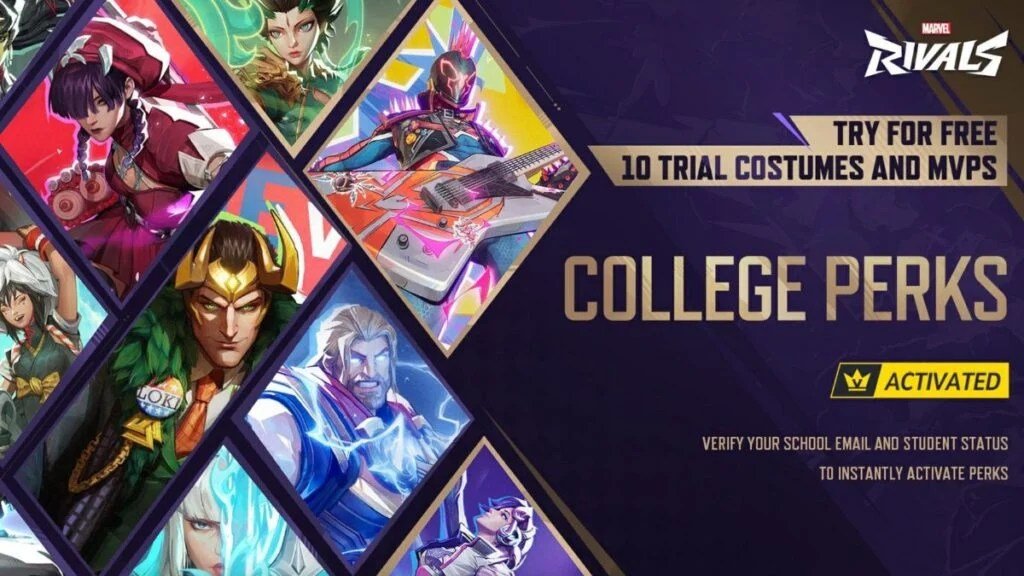
Exciting news for students ready to dominate the arena! Marvel Rivals Season 5 is rolling out a brand-new "College Perks" initiative, fundamentally changing how eligible players can access exclusive content and enhance their gameplay experience. Forget stale campus newsletters; we’re here to break down everything you need to know about the Marvel Rivals Season 5 College Event Rewards & Progression, ensuring you don’t miss out on a single benefit. This isn't just about getting cool stuff; it's about seamlessly integrating your academic life with your passion for intense 6v6 superhero action.
Whether you're a seasoned Rival or a fresh recruit, understanding this system is key to maximizing your fun and flexing some unique new looks.
At a Glance: Your Student Advantage in Marvel Rivals
- What it is: A new feature in Marvel Rivals Season 5 offering exclusive benefits to verified college/university students.
- The Big Reward: Immediate access to 10 trial costumes and MVPs (Most Valuable Player poses) for free.
- Duration: These trials are active throughout Season 5 and Season 5.5.
- How to Activate: Verify your student status in-game using your academic email.
- Eligibility: Supported academic email domains across numerous countries, with a detailed list available.
- Need Support? If your school isn't listed, you can request its addition through in-game customer support.
Decoding the College Perks: What They Are and Why They Matter
At its core, the College Perks system is a fantastic way for Marvel Rivals to acknowledge and reward its student player base. It's not just a participation trophy; it's a genuine benefit designed to give you a taste of premium content without an upfront cost. Think of it as your academic ID granting you backstage access to some of the game's most sought-after cosmetic items.
These "perks" manifest primarily as trial costumes and MVPs. For those unfamiliar, costumes change the appearance of your favorite heroes and villains, allowing for personalized flair, while MVPs are unique, dramatic poses characters strike at the end of a match when they've earned the MVP title. Having these on trial means you can experiment with new looks and celebrate victories in style, all while exploring different characters you might not typically play. It’s an ideal way to broaden your roster and find new mains without commitment.
The fact that these benefits extend through both Season 5 and Season 5.5 is a significant commitment, offering months of free content access. This longevity ensures you have ample time to enjoy your new trials and truly integrate them into your gameplay routine. It’s a smart move that builds community and rewards loyalty, especially for a demographic often juggling budgets and busy schedules. For a broader look at all the exciting updates this season, you might want to check out our guide on Marvel Rivals Season 5 student perks.
Unlocking Your Academic Advantage: Step-by-Step Activation
Getting your hands on these student rewards is surprisingly straightforward. Marvel Rivals has streamlined the verification process, making it quick and hassle-free, provided your academic institution is on their supported list. Here’s a detailed breakdown of how to activate your College Perks:
- Launch Marvel Rivals and Navigate to Settings:
- Once you’re in the game, look for the 'Settings' button. This is usually located in the upper right-hand corner of your screen, often represented by a gear or cog icon. Click on it to open the settings menu.
- Find the 'Community' Tab:
- Within the 'Settings' menu, you'll see various tabs or categories. Look for one labeled 'Community'. This section typically houses features related to player interaction, social options, and special events like College Perks.
- Select 'College Perks':
- Under the 'Community' tab, you should find a specific option dedicated to 'College Perks'. Click on this to initiate the verification process.
- Check for School Support:
- Before you enter any information, the game will likely present you with an interface to check if your academic email domain is supported. This might involve a search bar or a dropdown list. It's crucial to confirm your school's eligibility here first. If you don't see your school listed, don't fret – we'll cover what to do next in the eligibility section.
- Enter Your Student Email Address:
- If your school is supported, you'll be prompted to enter your official student email address. This is the email domain provided by your university or college (e.g.,
yourname@university.edu). Ensure you type it accurately to avoid delays.
- Retrieve and Enter the Verification Code:
- After submitting your student email, Marvel Rivals will send a verification code to that address. You'll need to check your student email inbox (including spam or junk folders, just in case) for this code. Once you have it, return to the game and enter the code into the provided field.
- Confirmation and Immediate Access:
- Upon successful entry of the verification code, your student status will be activated. The game should provide a confirmation message, and you will immediately gain access to your 10 trial costumes and MVPs. You can then head over to your hero roster and start experimenting with your new cosmetic options!
This process is designed for speed and security, ensuring that only currently enrolled students can claim these exclusive rewards. Remember, the perks are tied to your academic email, so personal email addresses won't work for verification.
The Sweet Rewards: What You Actually Get (And How Long You Get It)
So, you’ve verified your student status – congratulations! But what exactly are you getting? The core reward package for the Marvel Rivals Season 5 College Event is both generous and strategic:
- 10 Trial Costumes: These aren’t just palette swaps; these are full-fledged cosmetic changes for various characters. Having 10 means you get a diverse selection, potentially for multiple heroes across different classes. This allows you to personalize your favorite heroes or even try out new looks for characters you’re considering maining. The "trial" aspect means you get to use them as if you owned them, for a limited time, without spending any real-world currency or in-game credits. It’s a perfect opportunity to see if a particular skin is worth eventually acquiring permanently.
- 10 Trial MVPs (Most Valuable Player Poses): After a triumphant match where you secure the coveted MVP title, your character performs a special animation. With 10 trial MVPs, you’ll have a range of options to showcase your victory with extra flair. Just like the costumes, these trials let you experience premium celebration animations. It adds a layer of personalization and bragging rights to your post-match screen, making those MVP moments even more satisfying.
The Duration of Your Perks: Through Season 5 and 5.5
One of the most appealing aspects of these rewards is their longevity. Your access to the 10 trial costumes and MVPs isn't just for a week or two; it extends throughout the entirety of Season 5 and continues right into Season 5.5. This generous timeframe gives you several months of uninterrupted access to these exclusive cosmetic items.
This extended duration is crucial because it allows players to truly integrate these trials into their gameplay. You're not rushed to try them all before they disappear; instead, you can leisurely explore different costumes and MVPs, swap them out based on your mood or the character you're playing, and fully enjoy the enhanced visual experience for a substantial period. It’s a prolonged taste of the premium experience that truly adds value to being a verified student player.
Eligibility & Supported Institutions: Finding Your School
Before you dive into the settings menu, it’s smart to understand the eligibility requirements and where to find the list of supported institutions. Marvel Rivals is striving for broad global support, but the specifics can vary by region.
General Academic Email Domains:
For a wide array of countries, the system supports general academic email domains. This means if your university or college email ends in a common academic suffix (like .edu in the US, .ac.uk in the UK, etc.) and you’re in one of the listed regions, you’re likely covered. The countries with general academic email domain support include:
- Argentina
- Australia
- Colombia
- India
- Indonesia
- Japan
- New Zealand
- Philippines
- Saudi Arabia
- Singapore
- South Korea
- Thailand
- Turkey
- United Kingdom
- United States
Specific University Lists:
For other regions, Marvel Rivals has compiled specific lists of supported universities. This means your particular university needs to be explicitly on their roster for verification to work. Countries that rely on these specific university lists are: - Brazil
- Canada
- Chile
- Egypt
- France
- Germany
- Hong Kong
- Italy
- Mexico
- Netherlands
- Poland
- Spain
- Sweden
Where to Find the Full List:
Marvel Rivals provides a complete, up-to-date list of supported schools in a PDF document. While the ground truth doesn't provide a direct link, you should be able to access this PDF through the in-game 'College Perks' section or potentially on the official Marvel Rivals website or community forums. Always refer to the official PDF for the most current and accurate information.
My University Isn't Listed: What to Do Next
It's entirely possible your university, despite being legitimate, might not be on the initial list. Don’t let this deter you! Marvel Rivals has a clear process for requesting the addition of new institutions. They want as many eligible students as possible to enjoy these perks.
How to Request Your University's Inclusion:
- Access Customer Support In-Game:
- From the main game screen, click on the 'Settings' button (usually the gear icon in the upper right corner).
- Within the settings menu, look for 'CUSTOMER SUPPORT' and click on it. This will open the support interface.
- Prepare Your Information:
- To expedite your request, you’ll need to provide three key pieces of information:
- Country/Region: The country where your university is located. Be specific.
- Full University Name: Provide the complete, official name of your university or college. Avoid acronyms or nicknames initially.
- Student Email Domain: This is the part of your student email address that comes after the '@' symbol (e.g.,
university.edu,student.ac.uk).
- Submit Your Request:
- Follow the prompts in the customer support portal to submit a ticket or message. Clearly state that you are requesting the addition of your university for the College Perks program and provide the required information.
What to Expect After Submission: - Patience is Key: Adding a new university to their system isn't instantaneous. The support team will need to verify the institution's legitimacy and integrate its domain. This process can take some time.
- Monitor for Updates: Keep an eye on your student email or the in-game notification system for updates from the support team regarding your request. They might reach out for further clarification if needed.
- No Guarantees (But High Chances): While there's no guarantee that every requested university will be added, Marvel Rivals' proactive support system suggests they are keen on expanding eligibility. Providing accurate and complete information will significantly increase your chances.
This demonstrates Marvel Rivals' commitment to inclusivity for students globally. Don't hesitate to reach out if your institution is currently missing from the roster.
Maximizing Your Free Trials: Tips & Tricks
Having 10 trial costumes and MVPs for several months is a fantastic opportunity. Here's how to make the most of your newfound cosmetic bounty:
- Experiment Widely: Don't just stick to costumes for your main character. Use this chance to try out skins for heroes you've been curious about. It's a risk-free way to explore different aesthetics and see if a particular look inspires you to pick up a new character.
- Match Your Mood: Have a rough day studying? Log in and equip a vibrant, high-energy costume to lift your spirits. Feeling strategic? Opt for a more serious, tactical look. These trials allow you to visually express your mood and enhance your immersion.
- Show Off Your Style: MVPs are all about post-game celebration. Try out different poses for characters you frequently get MVP with. Find the one that best encapsulates your victory dance.
- Identify Future Purchases (or Avoid Buyer's Remorse): The "trial" aspect is invaluable for making informed decisions. If you fall in love with a particular costume or MVP, you'll know it's worth investing in if it becomes available for permanent purchase. Conversely, if a skin doesn't quite click, you've saved yourself the trouble (and expense) of buying it outright.
- Pair with Battle Pass Progression: As you progress through the Season 5 Battle Pass, you'll unlock additional items. See how your trial costumes complement other acquired cosmetics to create truly unique loadouts.
- Leverage for Content Creation: If you're a streamer or content creator, these trial items provide fresh visual content for your audience. Showcase new skins, discuss their design, and highlight the student perks program.
- Stay Updated on Season 5.5: Remember, these perks extend into Season 5.5. Keep an eye on game news for any further details or changes that might come with that mid-season update to ensure you continue to maximize your benefits.
Common Questions & Troubleshooting
Even with a smooth process, questions can arise. Here are some common queries and their answers regarding the College Perks:
Q: My verification email didn't arrive. What should I do?
A: First, check your spam or junk mail folders. Sometimes automated emails can get filtered there. If it's still not found after a few minutes, double-check that you entered your email address correctly. You might need to re-enter it and request another code. If problems persist, contact Marvel Rivals Customer Support via the in-game settings.
Q: What if my academic email address changes during Season 5 or 5.5?
A: If your academic email changes (e.g., you graduate or transfer), your verified status might eventually expire or become invalid if the new email isn't recognized. It's best to contact customer support immediately to understand if you can update your verification or if your perks will be affected.
Q: Are these trial costumes/MVPs permanent?
A: No, they are "trial" items, meaning they are temporary. Your access to them will last until the end of Season 5.5. After that, they will likely be removed from your inventory unless you purchase them permanently (if they become available for purchase).
Q: Can I use these trials in all game modes?
A: Yes, once activated, your trial costumes and MVPs function exactly like owned items for the duration of the trial period. You can use them in any game mode where cosmetics are displayed.
Q: I’m no longer a student, but I have an old academic email. Can I still get the perks?
A: Eligibility is generally for currently enrolled students. The verification system is designed to check for active student status. Attempting to use an old, inactive email might not work, or could lead to account issues if the terms of service are violated. It's always best to be truthful and ensure you meet the current student criteria.
Q: What happens if I request my school and it gets added later? Do I still get the perks?
A: Yes, if your school is added to the supported list during Season 5 or 5.5, you can then follow the activation steps and gain access to the trial perks for the remainder of their duration. The perks are activated upon successful verification, regardless of when your school was added.
Don't Miss Out: Your Next Steps
The Marvel Rivals Season 5 College Event is a fantastic opportunity for students to enhance their gameplay experience with exclusive trial cosmetics. This isn't just about looking good; it's about exploring new characters, finding new mains, and adding a fresh layer of enjoyment to every match.
Your immediate next step is clear:
- Verify Your Eligibility: Check the official PDF list of supported schools or the in-game eligibility checker.
- Activate Your Perks: Head into your game's settings, navigate to 'Community,' and then 'College Perks' to begin the simple email verification process.
- Request If Needed: If your university isn't on the list, don't delay in submitting a request through the in-game customer support.
This initiative is a testament to Marvel Rivals' commitment to its player base. By taking advantage of these College Perks, you're not just getting free content; you're becoming a part of a recognized and rewarded student community within the game. So, finish that homework, then jump into the multiverse and show off your campus pride!